
Album Event Simulator

Last updated: 2026-05-03
Page change log:
- Created: 2026-05-03
Page contents:
What are Album Events?
The 2026 Q1 update of Clash Royale released a new feature called Album Event. It introduces a new kind of seasonal progression, as players are asked to complete the albums in order to unlock some rewards. You can find more details in the RoyaleAPI blog that covered this release.
In short, Album Events have 2 layers:
- Unlock Snippets ➜ Complete Scene ➜ Get Reward
- Complete Scenes ➜ Complete Album ➜ Get Grand Prize
Clash Royale used the Album Event feature in March for the first time, and is going to use it again in May with some variations.
Album Simulator
In this post we'll explore the dynamics of the Album Event as a feature, to understand how the album is completed as snippets are collected.
We'll use a model that runs in Python and takes into account the real constants used inside the game. With this tool we can easily run thousands of simulations, modeling what players would experience throughout the season. Some key components that this model should have are:
- Snippet weights
- Distinction between random and unique snippets
- Keep track of duplicate snippet conversions
The key metric we are looking for is the amount of random snippets needed to complete the Album Event. This will directly correlate with the amount of days needed to play to reach the Grand Prize.
It's not only relevant to see what the average picks are, but also the spread of this distribution. The most important concerns for the album design are:
- Average picks: we want players to complete the album towards the end of the season, that way this feature can remain as an incentive for daily engagement throughout the month.
- Maximum picks: if a player is unlucky and gets many duplicate snippets, will they still be able to complete the album in time? Unique snippet conversion is meant to handle this, and we'll see how well it performs.
- Minimum picks: less of a concern, but shows how soon players will be able to complete the album if they are unusually lucky.
Simulation Results
The two setups we've seen for Album Events are quite different. They have a different amount of scenes, different weights and different conversion values. How does this affect the pace at which players complete the albums?
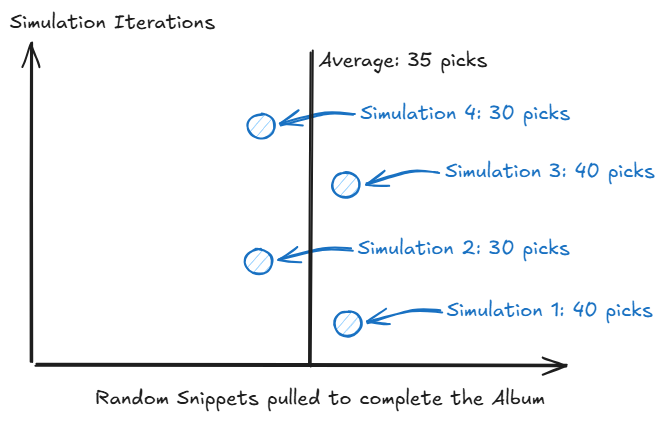
Let's first look at how to read the results. From every simulation we run, we'll keep track of the amount of picks needed to complete the album.
- We can represent each of these amounts as a blue circle, and pile them up together; the first iteration is at the bottom, and new iterations are added on top.
- With a black vertical line, we'll label the average of all of our samples.
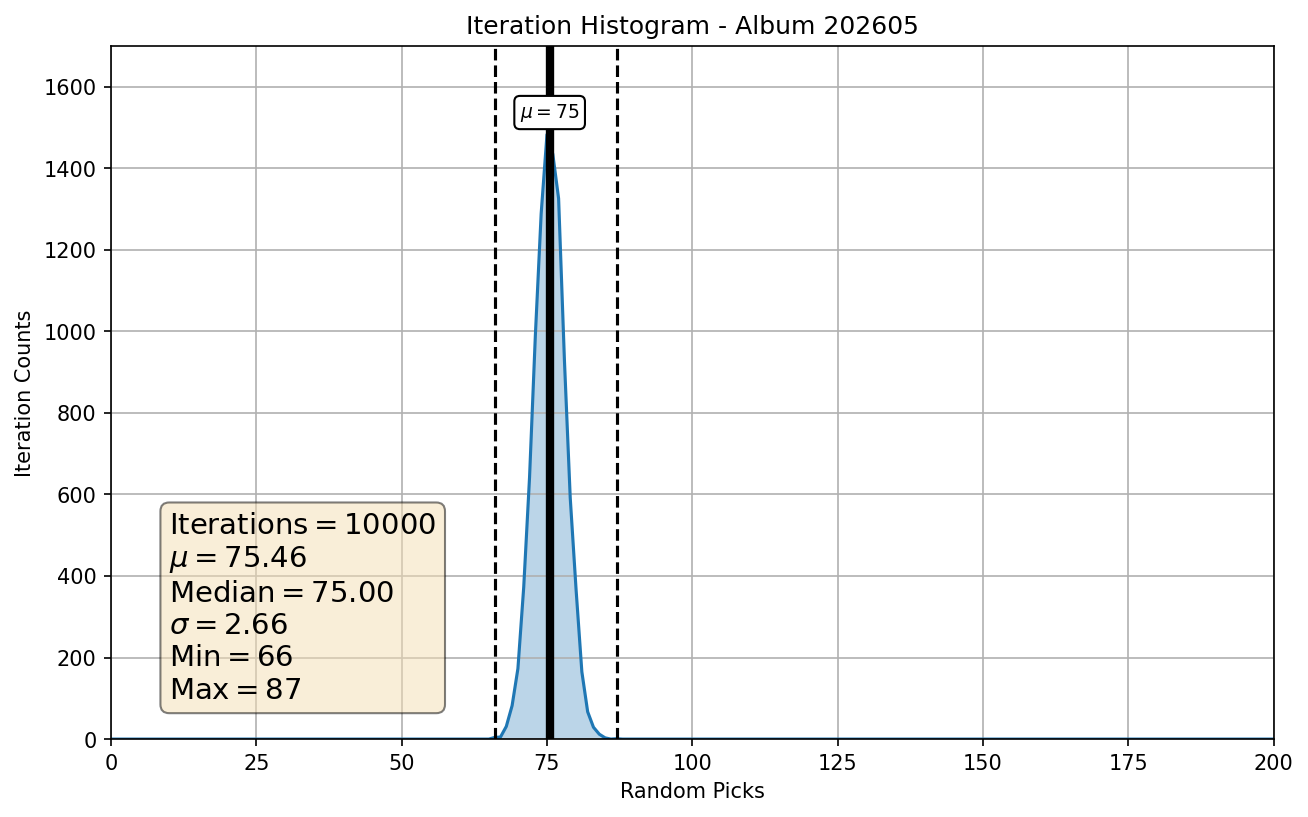
After running 10,000 simulation with the March album setup, this is what the results actually look like:
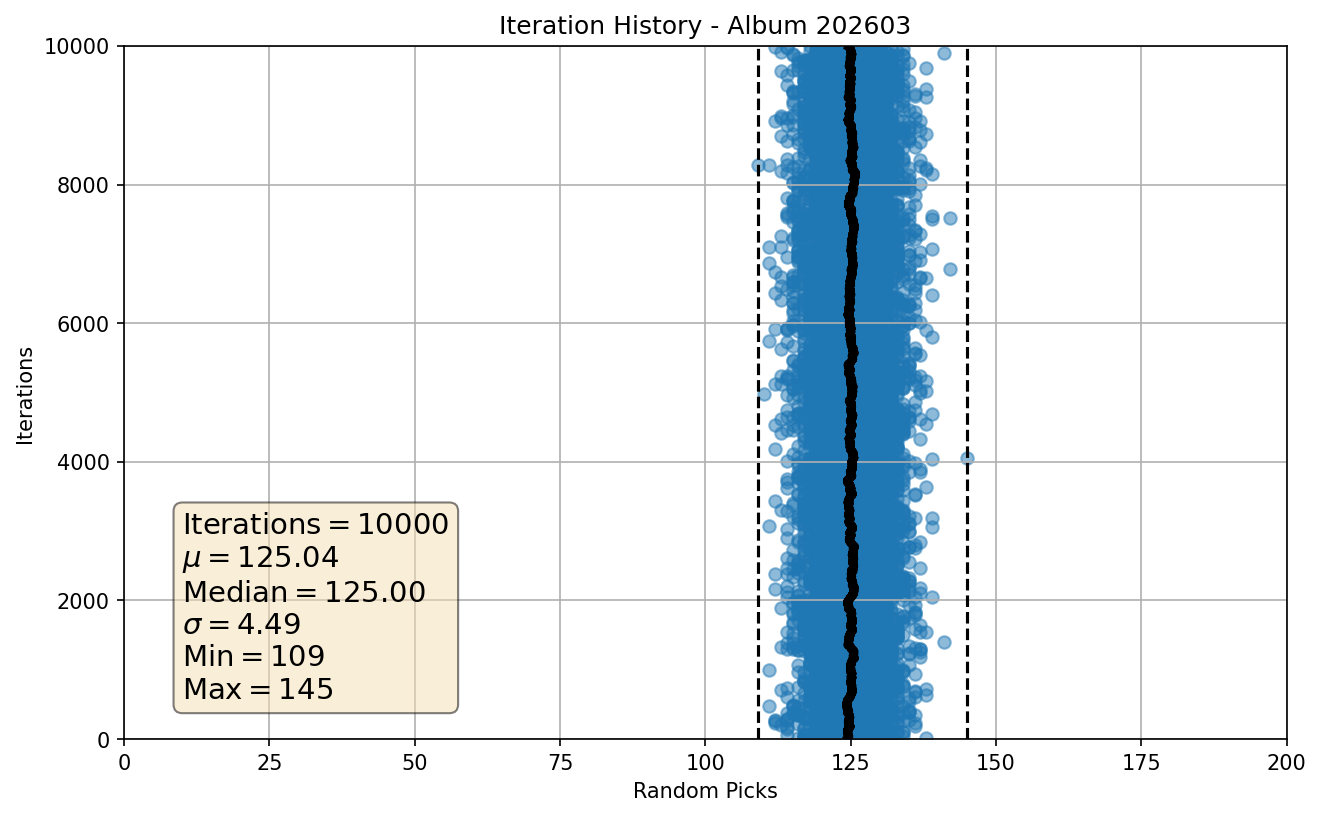
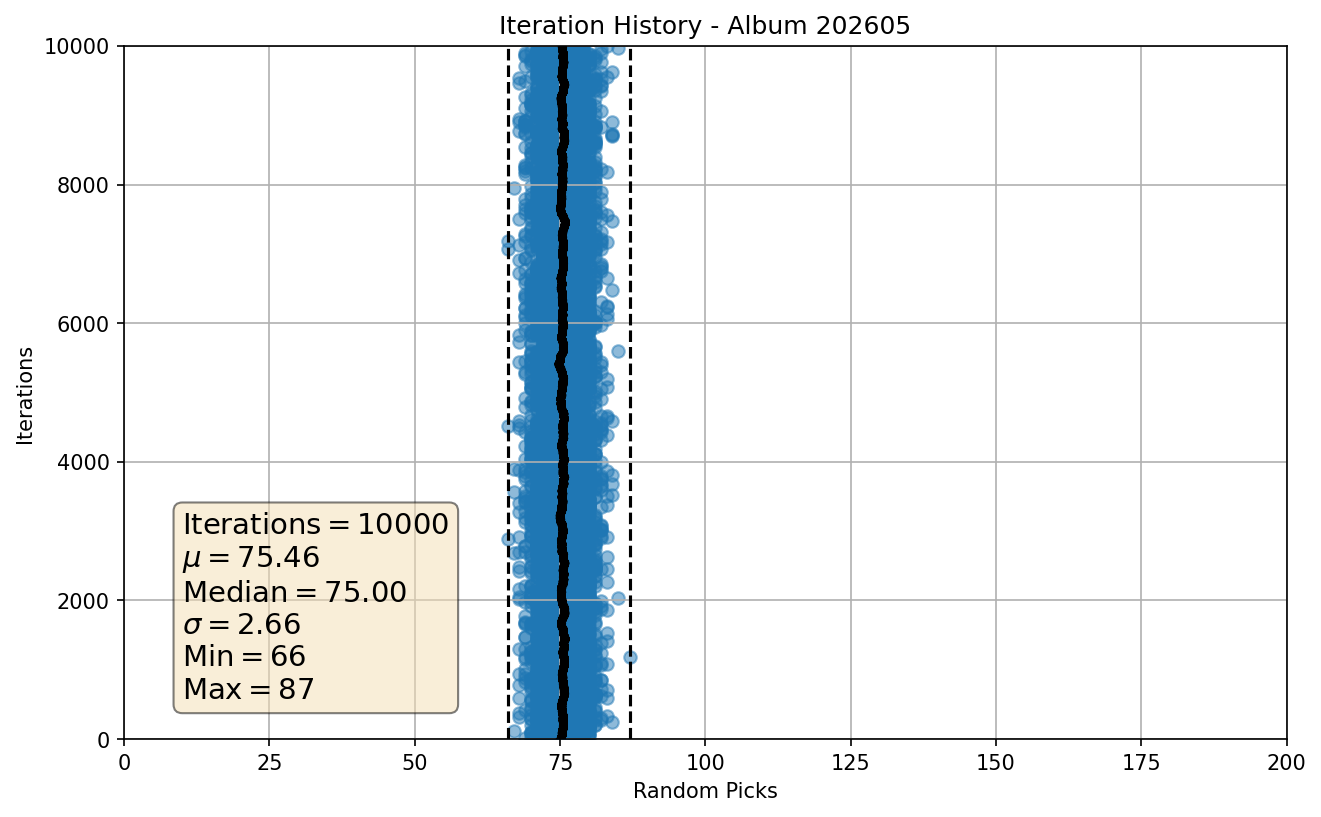
Chart for May Album Event
The black line in the middle represents the average, and the dashed lines are the minimum and maximum picks we found.
Although the scatter chart and standard deviation gives us a decent view of how the counts are distributed, it's more intuitive to visualise the distribution with a histogram:
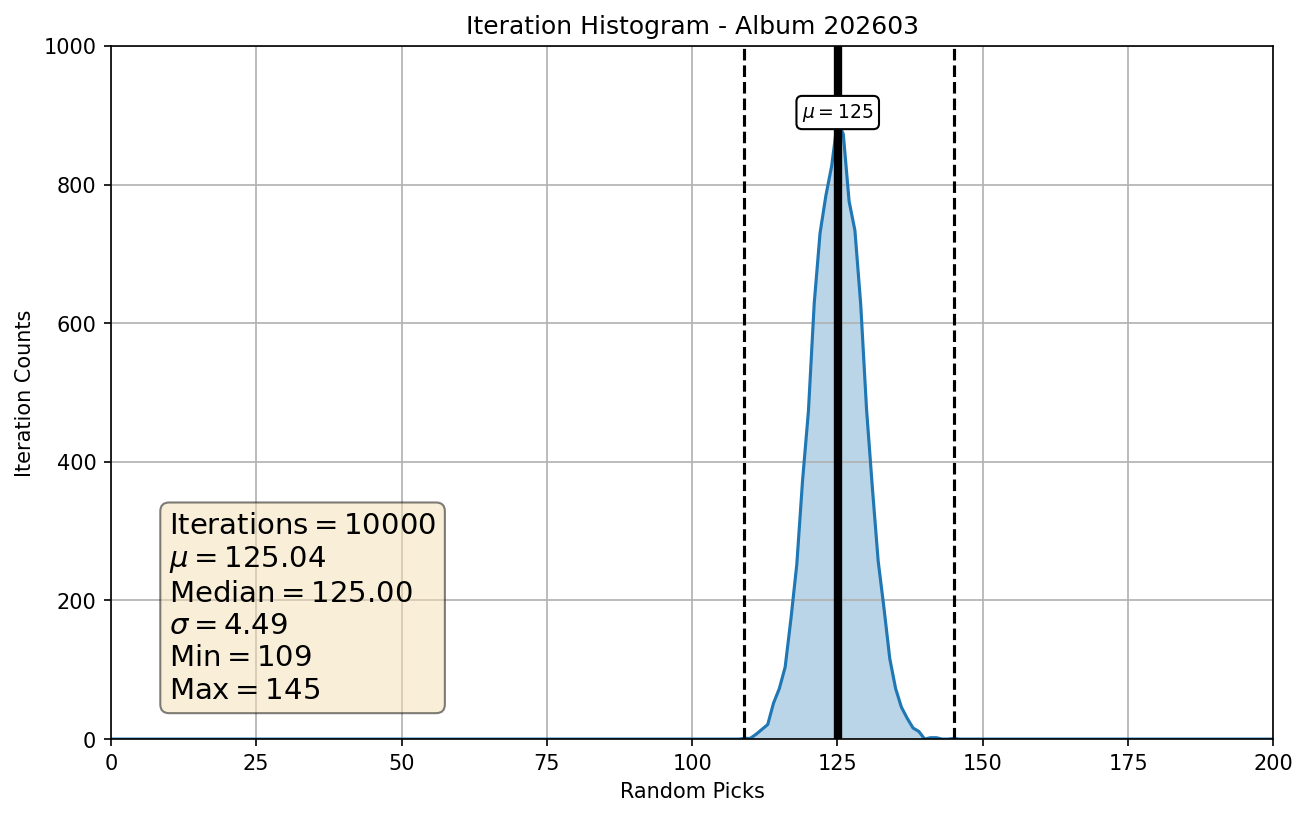
Chart for May Album Event
This chart makes it much easier to see that a majority players completes the album after pulling 120-130 random snippets.
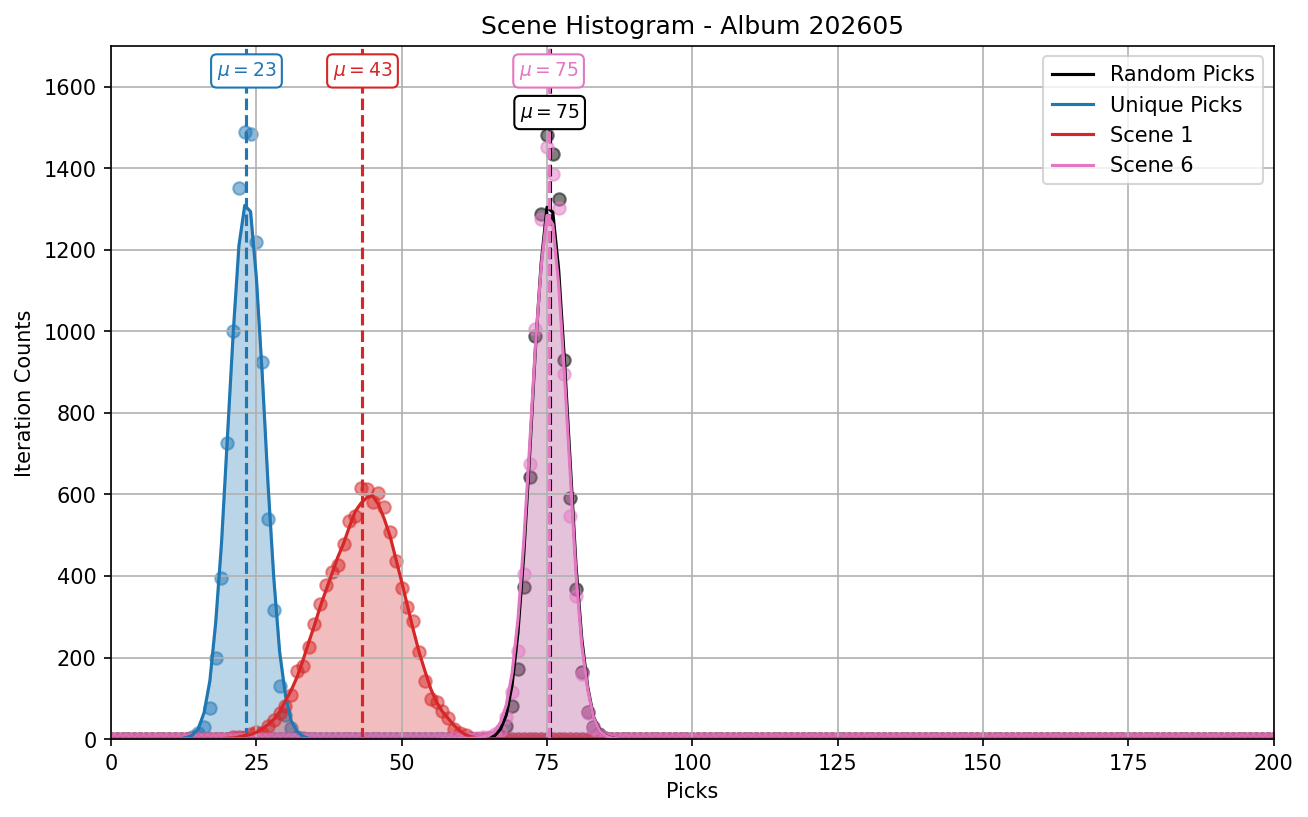
Now that we understand this distribution for album completion, we can add a few other metrics following the same format:
- Unique Picks: unique snippets obtained after triggering the pity system
- Scene 1: picks needed to complete Scene 1
- Scene 6: picks needed to complete Scene 6
- Scene 9: picks needed to complete Scene 9
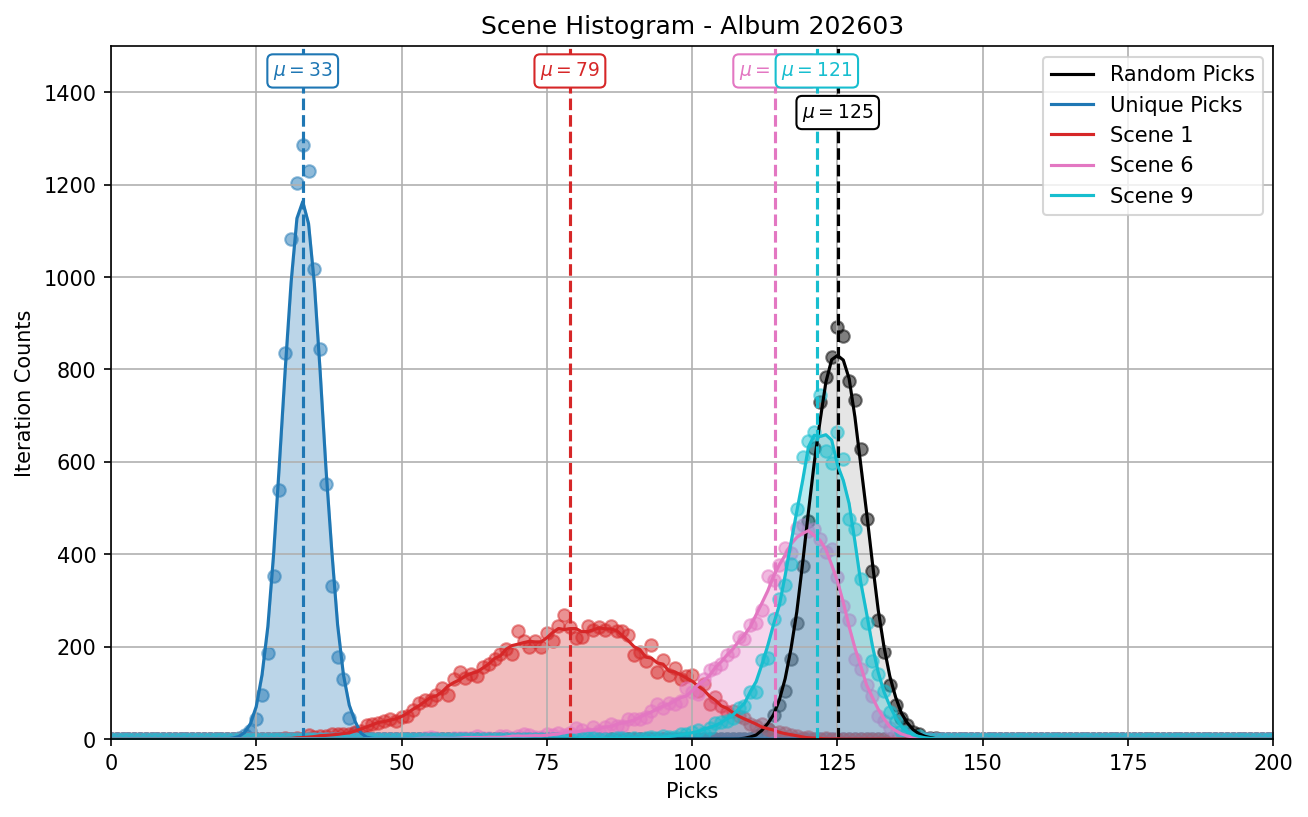
Chart for May Album Event
The 9th scene has a pick average that's quite close to the album total, but not identical. The difference is due to players who complete Scene 9 before other scenes.
The low variance in the amount of picks shows us that all players need a very similar amount of these to complete the album. This hints to this parameter as the main way to control the variance of the album feature, and we'll run a test to check it later.
March vs May
There are several changes between the two album event setups:
- Scene amount: March had 9, May has 6.
- Individual snippet weights
- Duplicate snippet conversion: higher in May
- Unique snippet requirement: higher in May
- Shorter event: March was 5 weeks, May is 3.
How do these changes affect the results?
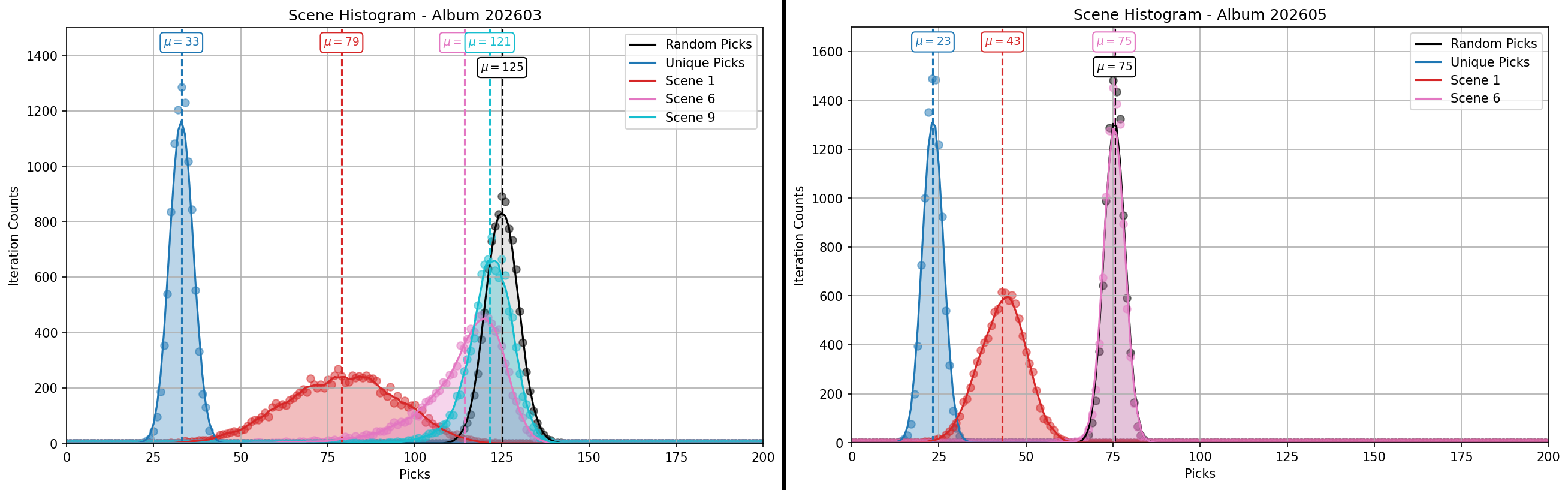
The average for album completion reduces from 125 to 75, which seems balanced with the 40% reduction in event duration.
Pity System Relevance
From March to May, the pity system requirement is increasing from 5 to 6, but there are many other changes happening at the same time.
Let's look at the unique snippet requirement in isolation, comparing the March setup (with 5) to a March variant that simply increases this requirement to 10.
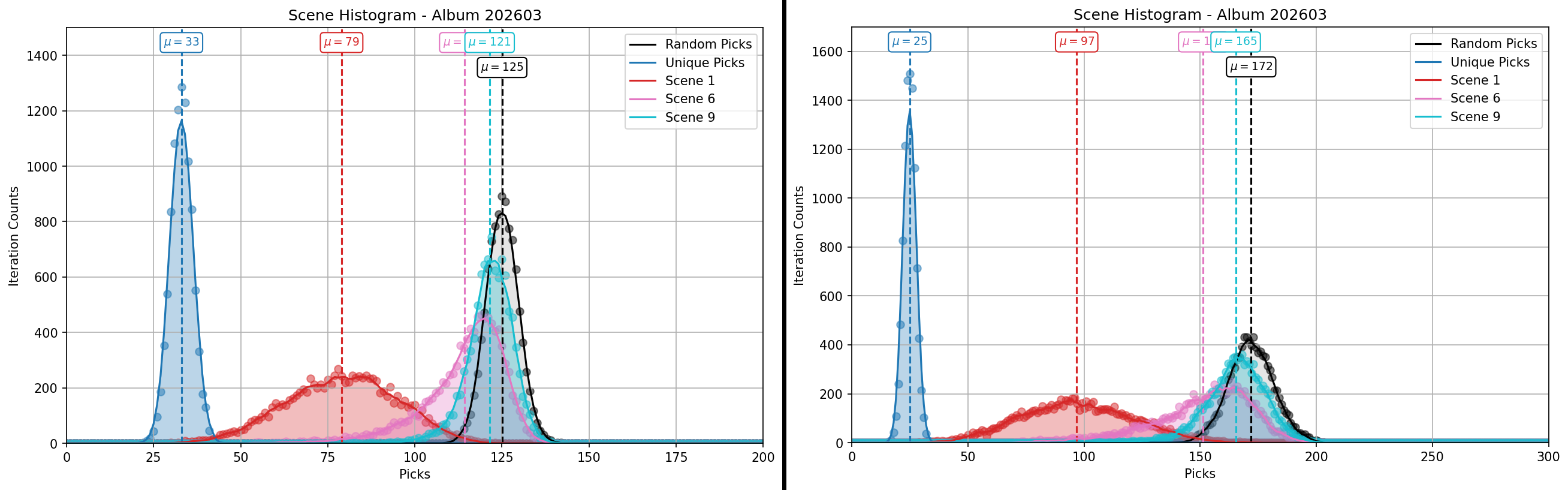
Not only does the mean increase significantly, from 125 to 172; the standard deviation more than doubles, from 4.5 to 9.6. This can lead to player frustration as more players are left behind, specially if less active players fail to reach the Grand Prize.
Simulator Code
The Python code to run these simulations is publicly available in this GitHub repository.
This repo includes the basic data for the 2 album setups, and creates charts like the ones share earlier.
Aside from that, the code is fairly basic. It includes:
- main: choose settings, manage iterations & save results
- plots: converts the results into charts with Matplotlib
- item_pool: model for a pool of items for random picks with and without removal
- album: model for a complete album event based on scenes and snippets
item_pool.py
class ItemPool(BaseModel):
    """
    Item pool manager.

    Args:
        items: List of items.
        weights: List of item weights.

    Attributes:
        items: List of items remaining in active pool.
        weights: List of item wights remaining in active pool.
        items_out: Items removed from the active pool.
        item_picks: Item weights removed from the active pool.
    """

    items: list[str]
    weights: list[int]

    items_out: list[str] = []
    item_picks: list[str] = []

    def pick_item(self) -> str:
        """Select a random item from active pool."""
        choice: str = random.choices(self.items, weights=self.weights, k=1)[0]
        self.item_picks.append(choice)
        return choice

    def remove_item(self, item: str):
        """Remove item from pool."""
        idx = self.items.index(item)
        self.items_out.append(item)
        self.items.pop(idx)
        self.weights.pop(idx)
        return True

    def empty_check(self):
        """Check if active pool is empty."""
        if len(self.items) == 0:
            return True
        else:
            return False
album.py
class PlayerAlbum:
    """
    Dynamic model of Clash Royale Album Collection.

    Args:
        df_random: Snippet specs for random pulls, which allow duplicates.
        df_unique: Snippet specs for unique pulls, which exclude duplicates.
        df_conversions: Duplicate snippet conversion values.
        unique_requirement: Cost to trigger a unique pull.
        debug: Option to save simulation logs.

    Attributes:
        pool_random: Item Pool of random snippets.
        pool_unique: Item Pool of unique snippets.
        snippet_scenes: dict(Snippet -> Scene).
        conversions: dict(Snippet -> Conversion value).
        unique_requirement: Cost to trigger a unique pull.
        debug: Option to save simulation logs.
        snippets_found: List of found snippets.
        last_find: Last snippet found.
        count_total: Total amount of snippets to complete the album.
        count_found: Counter of snippets found.
        unique_progress: Pity currency for unique snippets.
        count_random_picks: Counter of random snippets pulled.
        count_unique_picks: Counter of unique snippets pulled.
        collection_complete: Is collection complete status.
        scene_lists: Dictionary of remaining snippets per scene.
        scene_status: Is scene complete status.
        debug_log: List of log events.
    """

    def __init__(
            self,
            df_random: pd.DataFrame,
            df_unique: pd.DataFrame,
            df_conversions: pd.DataFrame,
            unique_requirement: int = 5,
            debug: bool = False,
            ):

        self.pool_random = ItemPool(items=df_random['key'].to_list(), weights=df_random['weight'].to_list())
        self.pool_unique = ItemPool(items=df_unique['key'].to_list(), weights=df_unique['weight'].to_list())

        self.snippet_scenes = dict(df_random[['key', 'scene']].to_records(index=False))
        self.conversions = df_conversions['value'].to_dict()
        self.unique_requirement = unique_requirement

        self.debug = debug

        self.snippets_found: list[str] = []
        self.last_find: str | None = None
        self.count_total: int = len(df_random)
        self.count_found: int = 0
        self.unique_progress: int = 0
        self.count_random_picks: int = 0
        self.count_unique_picks: int = 0
        self.collection_complete: bool = False
        self.scene_lists: dict[int, list[str]] = {}
        self.scene_status: dict[str, int] = {}
        self.debug_log: list[LogEntry] = []

        # Fill scenes with remaining snippets
        scene_ids = df_random['scene'].unique()
        for scene_id in scene_ids:
            mask_scene: pd.Series = (df_random['scene'] == scene_id)
            snippets: pd.Series = df_random.loc[mask_scene, 'key']
            self.scene_lists.update({scene_id: snippets.to_list()})
            self.scene_status.update({f"scene_{scene_id}": 0})

    def pick_random(self):
        """Trigger a random snippet pick."""
        self.count_random_picks += 1
        random_snippet = self.pool_random.pick_item()

        # Snippet is new
        if random_snippet in self.pool_unique.items:
            self.find_snippet(random_snippet)
            if self.debug:
                self.log_event(event="random_pick", context=random_snippet)

        # Snippet is duplicate
        else:
            # Manage duplicate conversion
            conversion_value = self.conversions.get(random_snippet, 0)
            self.unique_progress += conversion_value
            self.log_event(event="duplicate", context=random_snippet)
            # Exchange unique progress for unique pick
            if self.unique_progress >= self.unique_requirement:
                self.unique_progress -= self.unique_requirement
                self.pick_unique()

    def pick_unique(self):
        """Trigger a unique snippet pick."""
        self.count_unique_picks += 1
        unique_snippet = self.pool_unique.pick_item()
        self.log_event(event="unique_pick", context=unique_snippet)
        self.find_snippet(unique_snippet)

    def find_snippet(self, item: str):
        """Manage a newly found snippet."""
        self.pool_unique.remove_item(item)
        self.snippets_found.append(item)
        self.last_find = item
        self.count_found += 1
        self.scene_progress(item)
        self.collection_check()

    def collection_check(self):
        """Check completion status of album."""
        if self.count_found == self.count_total:
            self.collection_complete = True

    def scene_progress(self, item: str):
        """Update album progress."""
        scene_id = self.snippet_scenes[item]
        self.scene_lists[scene_id].remove(item)
        # Log scene completion details
        if len(self.scene_lists[scene_id]) == 0:
            self.scene_status.update({f"scene_{scene_id}": self.count_random_picks})
            self.log_event(event="scene_complete", context=f"scene_{scene_id}")

    def log_event(self, event: str | None = None, context: str | None = None):
        """Event logger."""
        self.debug_log.append(LogEntry(
            event=event,
            context=context,
            count_found=self.count_found,
            unique_progress=self.unique_progress,
            count_random=self.count_random_picks,
            count_unique=self.count_unique_picks,
        ))
In short, each simulation follows this structure:
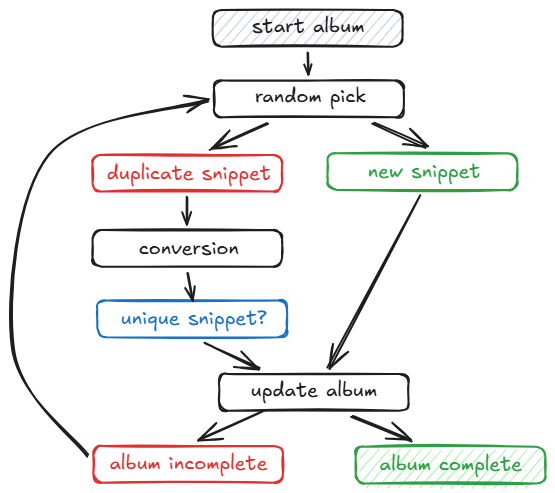
The loop of random picks keeps happening until the album is completed, which is guaranteed to happen in a limited amount of pick thanks to the unique snippet pity system.